Monday, May 2, 2011

Keyword Action Chatter Trigger – Keyword in chatter used to update/change records

This is a practice demo for the new chatter triggers, working from the released Spring '11
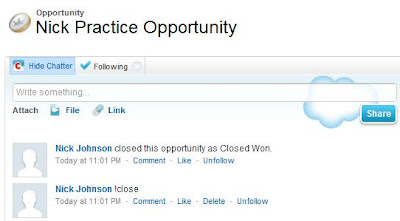
example. By typing the keyword  '!close'  on a Opportunity entity feed, it will automatically close the Opportunity. This could be a very usefull feature to quickly close an opp from a mobile phone on the mobile chatter app.

Here is the trigger code

Thursday, April 28, 2011

Ajax Collapsible Panel / Modal Popup Flicker on pageload fix

The Modal Popup Extender and the Collapsible Panel Extender sometimes cause the screen to flicker on page load. To solve for this do the following.

Modal Popup
Set the style property display to 'none'


Collapsible Panel Extender
Make sure the extender has SuppressPostBack="True", and on the panel itself set the Height="0px" and a style property overflow:hidden;


Visualforce component basic examples (more to come)

This is a collection of different basic visualforce components for getting started with developing in salesforce. Also a few examples of components that are similar to someone coming from a .NET background into salesforce developing. Hopefully eliminating wasted time searching all over for samples of these different controls.

Live demo available here.


Ajax Modal Popup Extender

Problem/Challenge:
Call on a Modal Popup represented in the Master Page's code behind from a content page in order to display the Magic 8 Ball project I created using the techniques from week 2 fundamentals of C# at Centriq. To do this I originally just re-created the entire project on the Project page. However I did not like having such a large amount of duplicate code.

Solution:
Using the Master Find Control Method allows full use of any control on the master page on all content pages with full functionality.

protected void magic8BallMPE_Click( object sender, EventArgs e) 
{ 
   ModalPopupExtender mpe8Ball = 
          Master .FindControl("mpe8Ball") as ModalPopupExtender;
   mpe8Ball.Show(); 
}


Image button causes validation

Problem/Challenge:
While creating my Contact form page I had several textboxes and a submit button all with various required entry validation assigned to them. This validation intended to prevent the submission of an incomplete form when clicking the submit button. The rest of the Contact page had additional buttons, represented on my master page, and when testing further realized these buttons when clicked from the Contact page, caused validation of the whole page to fire, preventing those buttons action from being executed due to the Contact form being incomplete.